
Looking to supercharge your Kodi setup? Doomzday Kodi Builds are your ticket to a next-level streaming experience—think movies, TV shows, live sports, and a slick interface, all in one package. Whether you’re on a Firestick, Android TV, or PC, I’ve got the simplest step-by-step guide to get you streaming in minutes. Let’s jump into installing Doomzday Kodi Builds and why they’re a fan favorite in 2025!
Why Choose Doomzday Kodi Builds?
Doomzday Builds, powered by the Doomzday Wizard, are pre-loaded Kodi setups that save you time. No more fiddling with add-ons or settings—these builds come packed with popular tools like Asgard and The Magic Dragon, plus eye-catching skins. From lightweight options for slower devices to feature-rich setups for power users, there’s a build for everyone. Ready to install? Let’s go!
What You’ll Need
- Kodi installed (grab it from kodi.tv if you haven’t).
- A solid internet connection.
- 5-10 minutes of your time.
⚠️ Attention, Kodi Users!
Kodi Addons and builds offer unlimited streaming content, but they could also get you into trouble if you’re caught streaming free movies, TV shows, or sports. Currently, your IP 2400:adc3:12c:e600:bcd3:880f:e0ab:5a62 is visible to everyone. Kodi users are strongly advised to always connect to a VPN while streaming online. Kodi VPN hides your identity plus bypasses government surveillance, geo-blocked content, and ISP throttling (which also helps in buffer-free streaming).
I personally use NordVPN, which is the fastest and most secure VPN. It is easy to install on Amazon FireStick and any other device. You get 3 months free and save 49% on its annual plans. Also, it comes with a 30-day money-back guarantee. If you are not satisfied, you can always ask for a refund.
Quick Safety Tip
Doomzday is a third-party build, so we’ll enable “unknown sources” in Kodi. Also, some add-ons might stream copyrighted content—totally legal to install, but use a VPN (like NordVPN) to stay safe and private. Alright, here’s how to do it!
How to Install Doomzday Kodi Builds: Step-by-Step
Step 1: Enable Unknown Sources in Kodi
Kodi blocks third-party installs by default—let’s fix that:
Launch Kodi on your device.
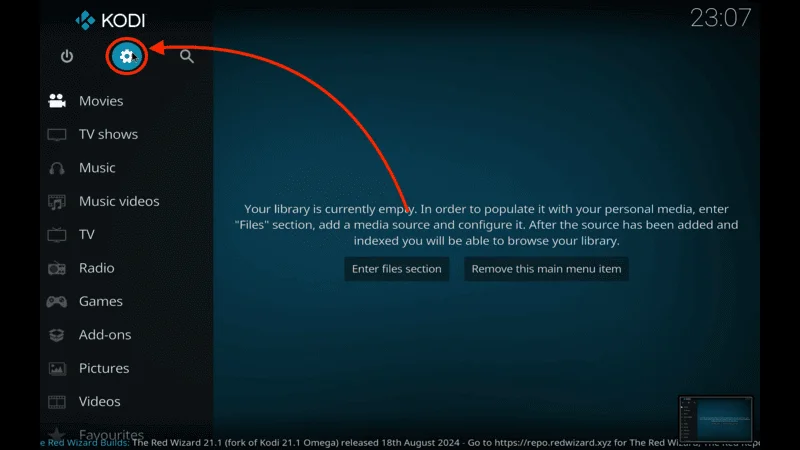
Click the gear icon (Settings) on the home screen.
Go to System > Add-ons.
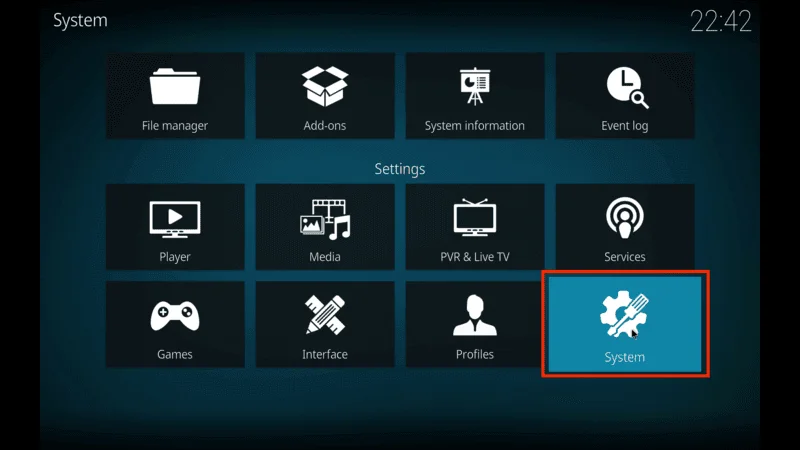
Toggle Unknown Sources to “On” and hit “Yes” on the warning.
Step 2: Add the Doomzday Wizard Source
Next, we’ll link Kodi to the Doomzday repo:
Back to Settings, select File Manager.
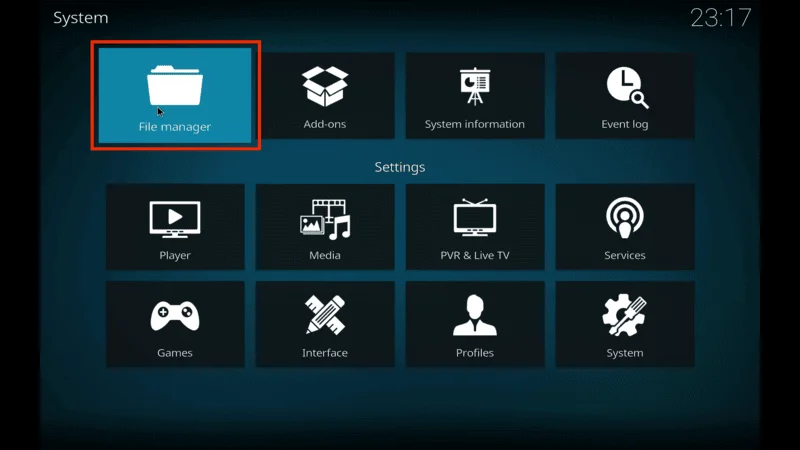
Click Add Source > .
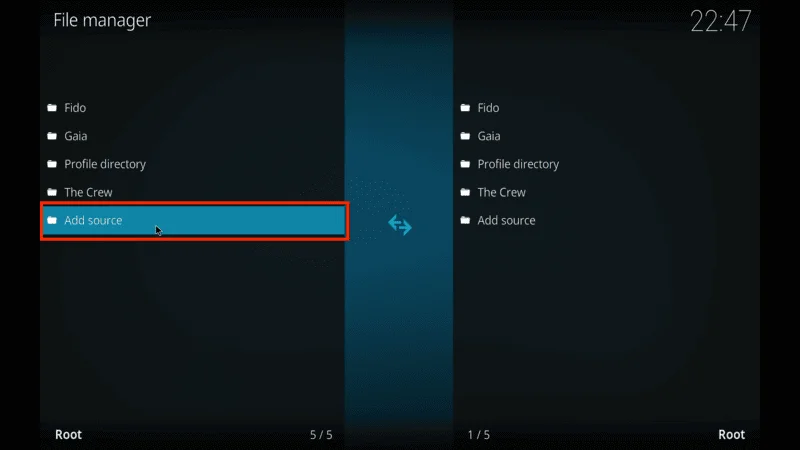
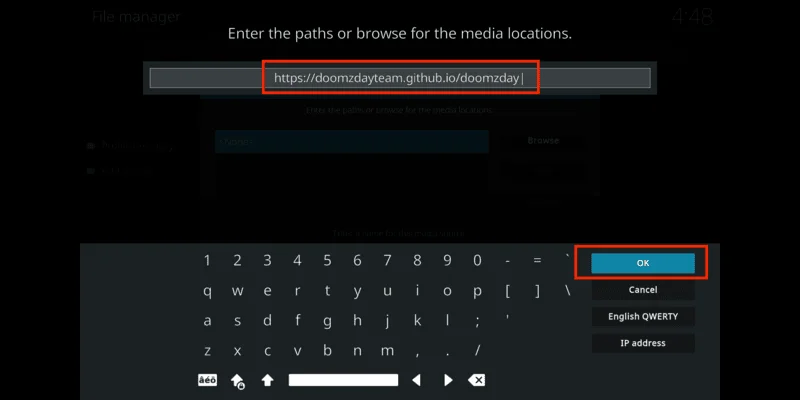
Type: https://doomzdayteam.github.io/doomzday (check for typos!).
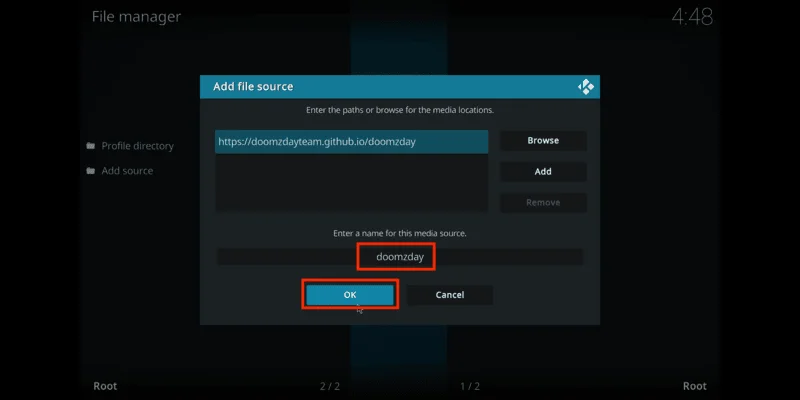
Name it “doomzday” and hit OK.
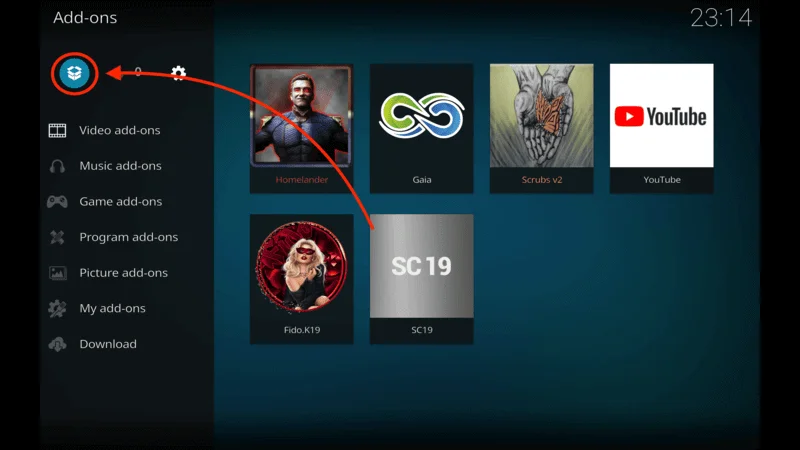
Go to Add-ons from the home screen.
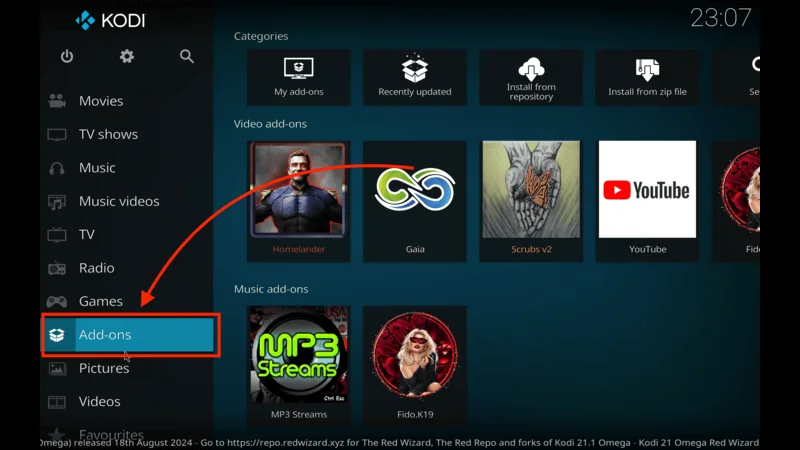
Click the open box icon
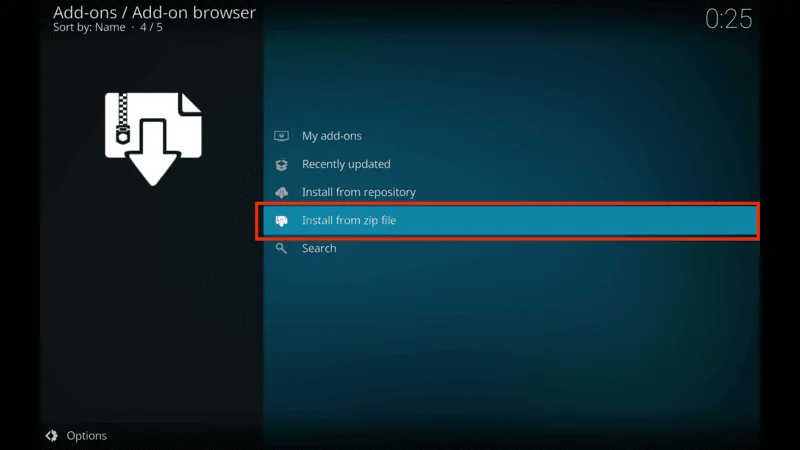
Install from zip file.
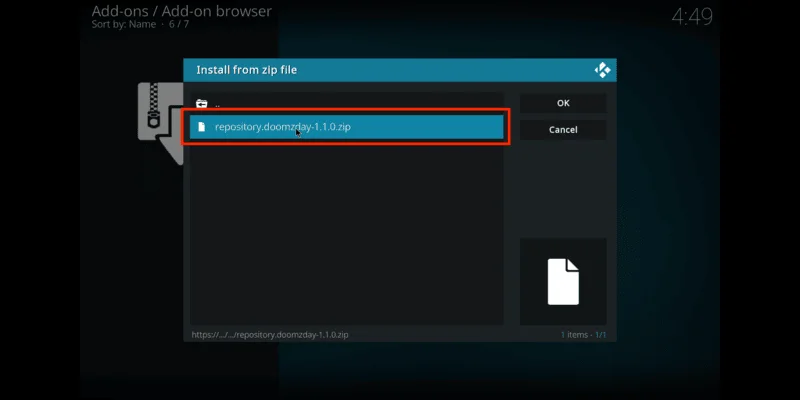
Pick “doomzday” > select the file (e.g., repository.doomzday-x.x.x.zip).
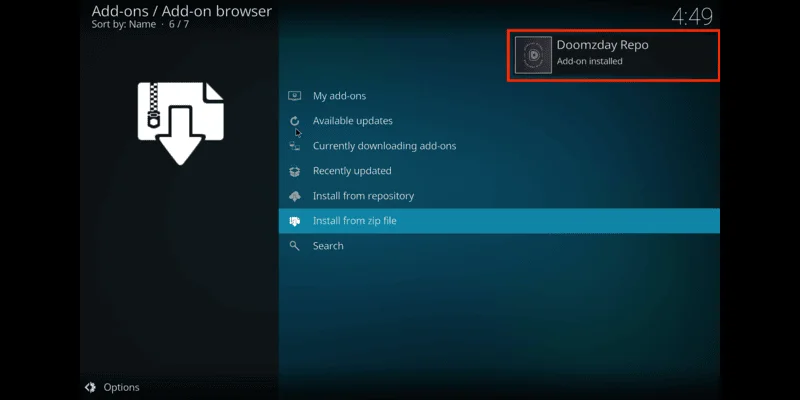
Wait for the “Doomzday Repo Add-on installed” notification.
Step 3: Install Your Doomzday Build
Time to pick your perfect build!
In Add-ons, go to Program add-ons > Doomzday Wizard.
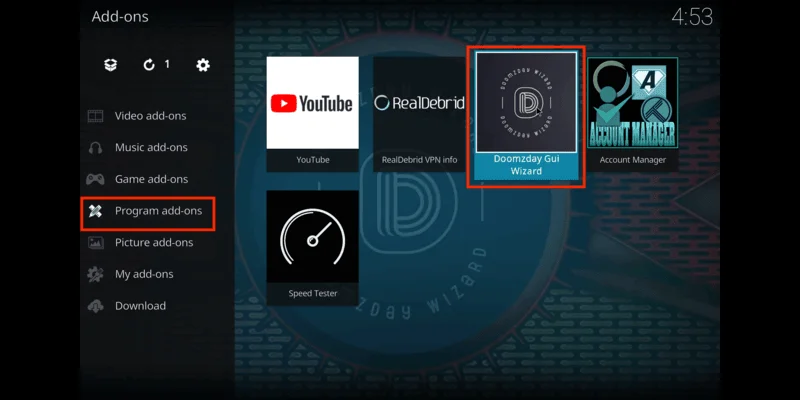
Click Builds—you’ll see options like “Nova TV,” “Sports 101,” or “Smokin.”
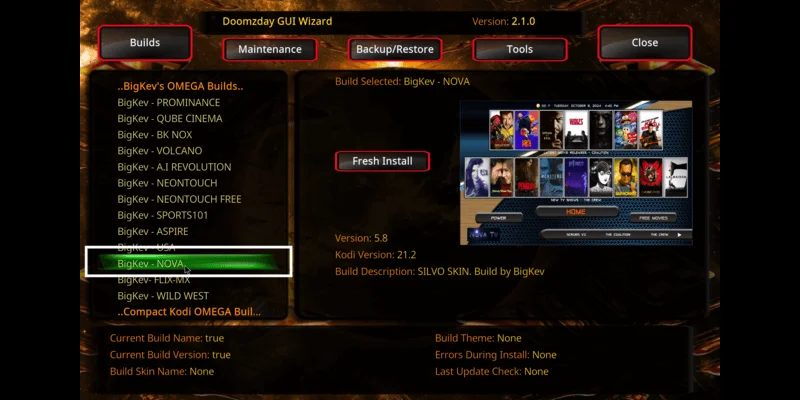
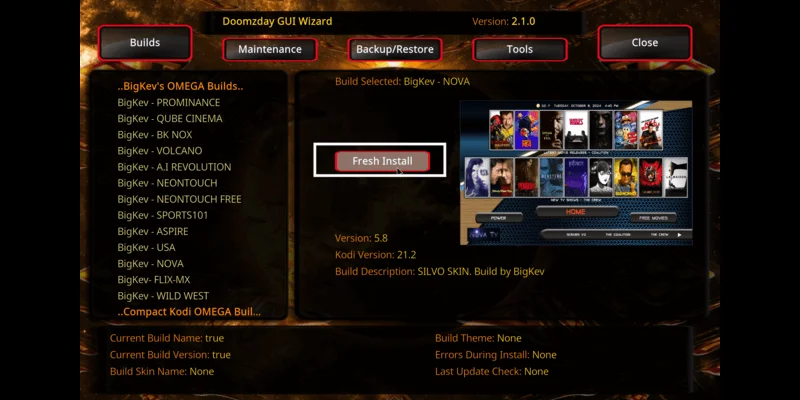
Choose a build (e.g., Nova TV) and hit Fresh Install for a clean setup.
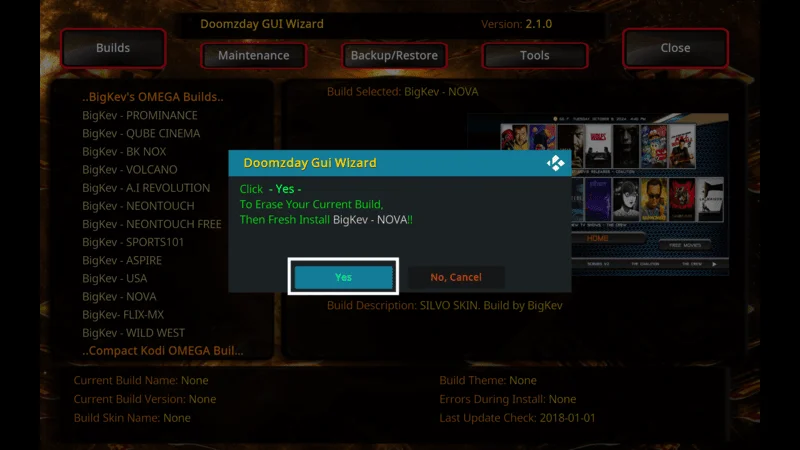
Click Yes—it’ll download and install (2-5 minutes).
Restart Kodi (unplug/replug on Firestick or exit/relaunch).
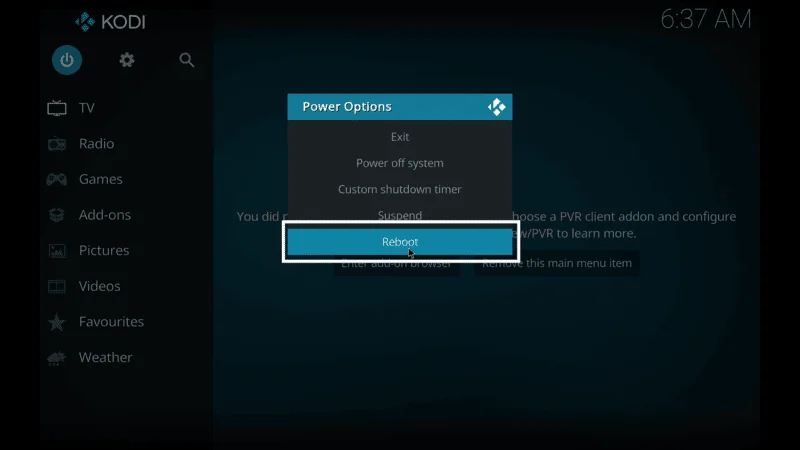
Wait 5 minutes for the build to load fully.
Boom! You’ve Installed Doomzday Kodi Builds
Pro Tips for 2025
- Use a VPN: Keep your streaming private and unlock more content.
- Test Add-ons: Some might need tweaking—popular ones work great out of the box.
- Update Regularly: Check the Doomzday Wizard for the latest builds.
How to Use Doomzday Kodi Builds Like a Pro
Finally installed your shiny new Doomzday Build? Sweet—congrats! Now let’s get you streaming like a total champ in no time. Here’s how to effortlessly make the most of your awesome Kodi setup:
Navigate the Home Screen: Open Kodi, and you’ll see a fresh layout with tabs like “Movies,” “TV Shows,” “Live TV,” or “Sports.” Each build (like Nova TV or Sports 101) has its own vibe—click around to explore!
Find Content: Hover over a category (e.g., “Movies”), then pick a sub-menu like “New Releases” or “Genres.” Select an add-on (say, The Magic Dragon) to pull up streaming links.
Start Streaming: Click a title, choose a link (higher quality ones are usually at the top), and hit play. Let it buffer for a sec—faster internet means less waiting.
Search Easily: Use the “Search” tool (often a magnifying glass icon) to hunt for specific shows or movies across all add-ons in one go.
Tweak It: Want a custom look? Check “Settings” in the build (usually a gear icon) to switch skins or reorder menus.
Quick Usage Tips
- Boost with Real-Debrid: Sign up for Real-Debrid and link it for HD streams and less buffering—total game-changer.
- Save Favorites: Long-press a title (or right-click) to add it to “Favorites” for later.
- Test Add-ons: Some links flop—try a few add-ons per category to find the best ones.
Is It Safe & Legal?
The Doomzday Wizard is safe (VirusTotal-approved!), but add-on content varies. Streaming copyrighted stuff? That’s on you—use a VPN to play it smart.
Troubleshooting Common Issues
- Zip File Failed”: Double-check the URL (https://doomzdayteam.github.io/doomzday)—typos are the usual culprit.
- Slow Download: Test your internet speed. If it’s sluggish, try a wired connection.
- Build Won’t Load: Do a fresh install again or switch to a lighter build like “Smokin” for older devices.
Best Doomzday Builds to Try in 2025
- Nova TV: Perfect for movie buffs and TV bingers—sleek and speedy.
- Sports 101: A must for sports fans with live streams galore.
- Smokin: Lightweight, great for low-spec devices like older Firesticks.
Why This Works in 2025
Doomzday Kodi Builds are trending for a reason: they’re easy, fast, and packed with value. This guide is optimized for Firestick, Android, and beyond, so you’re covered no matter your device. Want more Kodi tips? Check out our Kodi Add-ons Guide or Best VPNs for Streaming. Got a question? Drop it in the comments—I’ll help you troubleshoot!
Keywords to Rank For:
- How to Install Doomzday Kodi Builds
- Doomzday Kodi Builds 2025
- Best Kodi Builds Tutorial
Happy streaming, and enjoy your new Kodi setup!